Messaging
SMS Messaging & Consent
How MovementAtlas sends text messages, how you give consent, and how to stop at any time.
Last updated: 19 June 2026
About MovementAtlas
MovementAtlas LLC operates movementatlas.com, a U.S.-based online marketplace where people discover and book movement, fitness, and wellness classes with independent instructors and studios. Our SMS program supports your account and bookings — it is transactional, not promotional.
Messaging program at a glance
| Program name | MovementAtlas Account & Booking Notifications |
|---|---|
| What we send | One-time verification codes, booking confirmations, class and appointment reminders, and replies to support requests you initiate. |
| Message frequency | Recurring; varies based on your account activity and bookings. |
| Cost | Message and data rates may apply. MovementAtlas does not charge for these messages. |
| Marketing | Not sent on this program. Promotional messages are a separate, independent setting that is OFF by default. |
How you opt in
SMS is never required to use MovementAtlas or to make a purchase. You give your consent yourself — in the open, during sign-up (no account or login needed to see it):
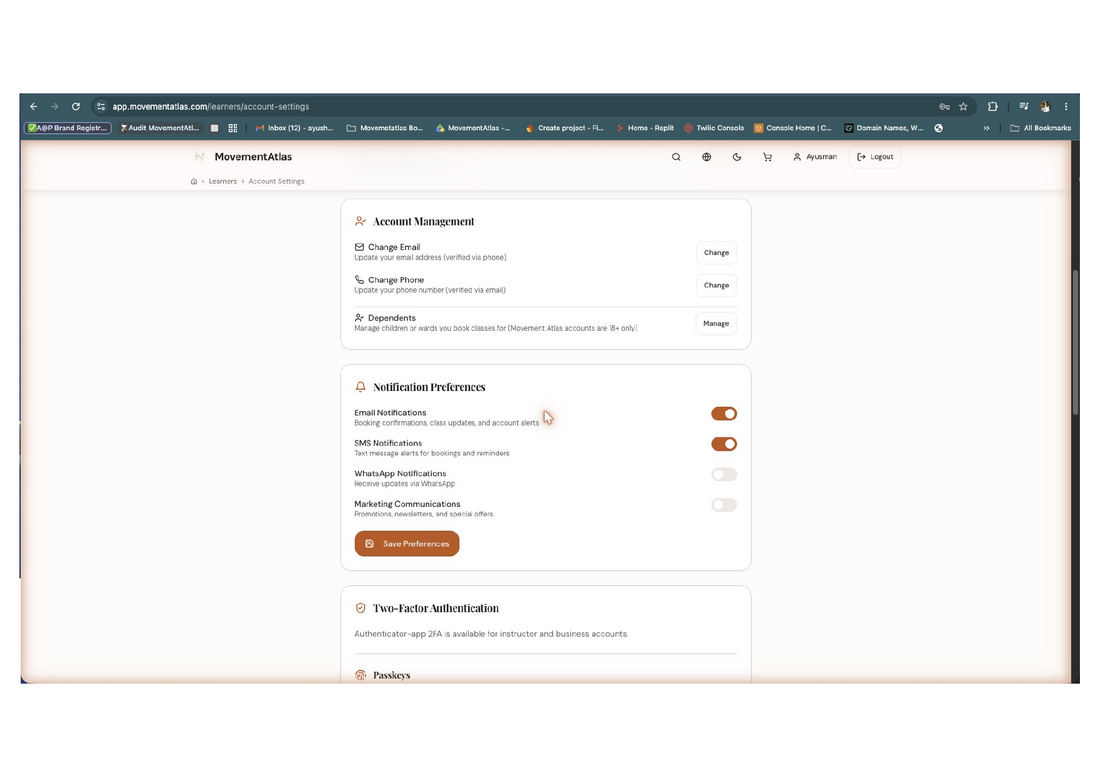
- On the public sign-up at movementatlas.com/register, add your mobile number and check the SMS consent box on the final “Security settings” step. The box is unchecked by default; checking it is your explicit consent to receive the automated transactional & support text messages described above. (See the screenshot below.)
- Prefer to do it later? Sign in and go to Account Settings → Notification Preferences — the same consent control, OFF by default.
- Switch the SMS text message consent control ON. It is OFF by default — turning it on is your explicit consent.
- Reply STOP to any message to opt out instantly, or HELP for help.
Message and data rates may apply; message frequency varies. Consent is not a condition of any purchase. Reply HELP for help, STOP to opt out at any time. Privacy Policy · SMS Terms
What the opt-in looks like
Below is the SMS consent checkbox exactly as it appears on our public sign-up at movementatlas.com/register — no account or login required. It is unchecked by default, separate from marketing, and never a condition of using the service.
How you opt out
- Reply STOP to any message to unsubscribe immediately, at any time.
- Or switch the SMS text message consent toggle OFF in Account Settings → Notification Preferences and save.
- Reply HELP for help, or contact us using the details below.
After you opt out you will stop receiving these texts. You can re-enable them anytime by turning the toggle back on or by replying START.
Sample messages
MovementAtlas: Your verification code is 482913, valid for 10 minutes. Reply STOP to opt out, HELP for help.
MovementAtlas: Hi Maya, your session with coach Ravi is confirmed for Thu Jun 12, 6:00 PM. Reply STOP to opt out, HELP for help. Msg & data rates may apply.
Privacy & data
We do not sell or share your mobile number, and we do not share it with third parties for their own marketing. Mobile information is used solely to deliver the account and booking messages you opted into.
Privacy Policy · Terms of Service
Contact & support
Toll-free: +1 (888) 887-8058 · Local: +1 (628) 231-6766
Support hours: Monday–Friday, 9:00 AM – 6:00 PM EST
MovementAtlas LLC · 8 The Green, Suite R, Dover, DE 19901, USA · © 2026 MovementAtlas LLC. This page describes our SMS consent and messaging practices for transparency and carrier compliance.